![Ravyen Transparent 1390x426-1.png]](https://insights.rayven.io/hs-fs/hubfs/000%20-%20Rayven/Rayven%20Brand%20Assets/Rayven%20Logos/Ravyen%20Transparent%201390x426-1.png?height=50&name=Ravyen%20Transparent%201390x426-1.png)
What It Does
The Queue Node allows workflows to emit one payload at a time on a timed schedule. It acts as a buffer between fast or bursty inputs and downstream components that require consistent timing. If too many payloads arrive in a short time, the node holds them temporarily and releases them in order at the configured rate.
Step-by-Step: How to Configure the Queue Node
-
Add the node
-
Drag the Queue Node from the Logic panel to your workflow canvas.
-
-
Connect upstream sources
-
Link one or more nodes that emit payloads to be rate-limited or serialized.
-
-
Open configuration
-
Double-click the Queue Node to configure its timing and queue settings.
-
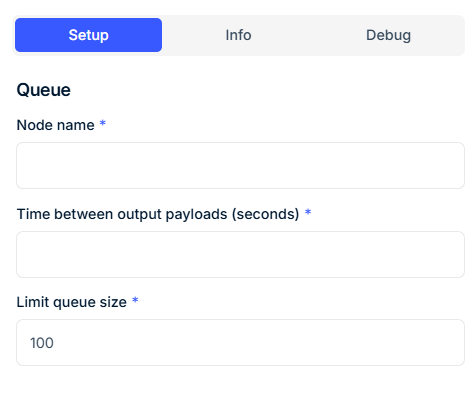
Configuration Fields
| Field | Requirement | Description |
|---|---|---|
| Node Name* | Required | Logical identifier for this node. Used internally and for reference. |
| Interval (Seconds)* | Required | Time delay between each emitted payload. Note: Ensure the total time to drain the queue ( interval × number of devices) is less than the input arrival rate; otherwise, payloads may pass through unqueued. |
| Maximum Queue Size* | Required | Defines the queue capacity. If the number of incoming payloads exceeds this limit, excess payloads are forwarded immediately without delay. |
Output Behavior
-
Payloads are stored in the order they are received.
-
Every N seconds (defined by the interval), one payload is emitted.
-
If the queue is empty, no output is generated.
-
When incoming rate exceeds drain rate and the queue is full, excess payloads bypass the delay and are passed through immediately.
Example:
If 5 payloads are queued and Interval = 2:
Payload 1 → emitted at t + 0s
Payload 2 → emitted at t + 2s
Payload 3 → emitted at t + 4s
Payload 4 → emitted at t + 6s
Payload 5 → emitted at t + 8s
If a 6th payload arrives and the queue size is limited to 5, it is forwarded instantly.
Best Practices
-
Select a queue size that matches expected burst size to avoid unintentional pass-through.
-
Use an interval aligned with downstream capacity (e.g., chart updates or API limits).
-
Ensure that the product of interval × queue size is sufficient to handle temporary input surges.
-
Monitor queue behavior in high-throughput environments to avoid unintended bypass of queued delivery.
Use Cases
-
Rate-limit payloads going to dashboards, APIs, or email/sms services
-
Space out output to time-series charts that update every few seconds
-
Serialize incoming telemetry for ordered archival
-
Prevent flooding of third-party systems with bursts of sensor data
FAQ
Q: What happens when the queue fills up?
A: Any new payloads beyond the queue size are emitted immediately without delay.
Q: Does the node drop data?
A: No. Payloads are either delayed (if space is available) or passed through immediately.
Q: Can this node emit batches?
A: No. It emits exactly one payload per interval. For batch control, use a different strategy such as a buffer or aggregate node.